Thursday, October 6, 2011

VBA code to script a table definition to Jet SQL

The vba code below can be used to script an access table into JET SQL. The function can handle multiple tables separated by commas. To use it, open your ms access database create a new module and paste the code of the subroutine. You can then call it from the immediate window like this:
Call TableCreateDDL("Table1", "Table2")

Here is the sub:

Public Sub TableCreateDDL(ParamArray tbls())

    Dim fldDef As DAO.field, rel As DAO.Relation
    Dim ifldIndex As Integer
    Dim fldName As String, fldDataInfo As String
    Dim tblDDL As String
    Dim TableDef As DAO.TableDef
    Dim idx As DAO.index
    Dim pkname As String
    Dim pkfieldName As String
    Dim fks As String
    Dim d As Database
    Dim tbl As String
    Dim ct As Integer
    
    Set d = CodeDb
    
    For ct = 0 To UBound(tbls)
        tbl = tbls(ct)
        fks = ""
        Set TableDef = d.TableDefs(tbl)
        
        For Each idx In TableDef.Indexes
            If idx.Primary Then
                pkname = idx.Name
                pkfieldName = idx.Fields(0).Name
                Exit For
            End If
            If idx.Unique Then
                If fks <> "" Then
                    fks = fks & ","
                End If
                fks = fks & "CONSTRAINT " & idx.Name & " UNIQUE ("
                For ifldIndex = 0 To idx.Fields.Count - 1
                    Set fldDef = idx.Fields(ifldIndex)
                    If ifldIndex > 0 Then
                        fks = fks & ","
                    End If
                    fks = fks & fldDef.Name
                Next
                fks = fks & ")"
            End If
            
        Next
        For Each rel In d.Relations
            If LCase$(rel.ForeignTable) = LCase$(tbl) Then
                'Debug.Print rel.ForeignTable
                If fks <> "" Then
                    fks = fks & "," & vbCrLf
                End If
                fks = fks & vbTab & "CONSTRAINT [" & rel.Name & "] FOREIGN KEY (" & rel.Fields(0).Name & _
                    ") REFERENCES " & _
                    rel.Table & "(" & rel.Fields(0).ForeignName
                fks = fks & ")"
                If DAO.dbRelationUpdateCascade = (rel.Attributes And DAO.dbRelationUpdateCascade) Then
                    fks = fks & vbCrLf & vbTab & vbTab & " ON UPDATE CASCADE "
                End If
                
                If DAO.dbRelationDeleteCascade = (rel.Attributes And DAO.dbRelationDeleteCascade) Then
                    fks = fks & vbCrLf & vbTab & vbTab & " ON DELETE CASCADE "
                End If
            End If
        Next
        
        tblDDL = tblDDL & "create table [" & tbl & "] (" & vbCrLf
        
        For ifldIndex = 0 To TableDef.Fields.Count - 1
            'For Each fldDef In TableDef.Fields
            Set fldDef = TableDef.Fields(ifldIndex)
            
            fldName = fldDef.Name
            fldName = "[" & fldName & "] "
            
            If dbAutoIncrField = (fldDef.Attributes And dbAutoIncrField) Then
                fldDataInfo = " AUTOINCREMENT "
            Else
            
                Select Case fldDef.type
                    Case dbBoolean
                        fldDataInfo = "BOOLEAN"
                    Case dbByte
                        fldDataInfo = "BYTE"
                    Case dbInteger
                        fldDataInfo = "INTEGER"
                    Case dbLong
                        fldDataInfo = "LONG"
                    Case dbCurrency
                        fldDataInfo = "CURRENCY"
                    Case dbSingle
                        fldDataInfo = "SINGLE"
                    Case dbDouble
                        fldDataInfo = "number"
                    Case dbDate
                        fldDataInfo = "date"
                    Case dbText
                        fldDataInfo = "varchar(" & format$(fldDef.Size) & ")"
                    Case dbLongBinary
                        fldDataInfo = "****"
                    Case dbMemo
                        fldDataInfo = "MEMO"
                    Case dbGUID
                        fldDataInfo = "nvarchar2(16)"
                End Select
                If fldDef.required Then
                    tblDDL = tblDDL & " not null"
                End If
            
            End If
            
            If ifldIndex > 0 Then
                tblDDL = tblDDL & ", " & vbCrLf
            End If
            tblDDL = tblDDL & vbTab & fldName & " " & fldDataInfo
        
        Next
        If (pkname <> "") Then
            tblDDL = tblDDL & "," & vbCrLf & vbTab & "CONSTRAINT  " & pkname & " PRIMARY KEY (" & pkfieldName & ")"
        End If
        If fks <> "" Then
            tblDDL = tblDDL & "," & vbCrLf & vbTab & fks
        End If
        
        tblDDL = tblDDL & ")" & vbCrLf
        
    Next
    
    Debug.Print tblDDL

    Set d = Nothing
    Set TableDef = Nothing
    Set fldDef = Nothing
    Set idx = Nothing
    Set rel = Nothing
    
End Sub
As an example, in one of our access database projects we had to script table called "ssirate" Here is the output of the above sub call:
create table [ssirate] (
    [ssirid]   AUTOINCREMENT  not null, 
    [socinsCategoryid]  LONG not null, 
    [payrollItemId]  LONG not null, 
    [effectiveDate]  date not null, 
    [rate]  SINGLE, 
    [createdate]  date, 
    [updatedate]  date, 
    [createuser]  LONG, 
    [updateuser]  LONG,
    CONSTRAINT  PK_ssirate PRIMARY KEY (ssirid))

Thursday, September 15, 2011

Manual Auditing of Oracle data changes using "Mirror" tables

In one of our projects we had a requirement to log every data change on certain tables, and keep a history of each record. We came across this article by Michael Klaene. We thank him and re publish the code here just in case his page is pulled off the net.
Part 1: Create Mirror Tables
Run the procedure below to create a "Mirror" table for each data table in the database.
create or replace procedure usp_create_audit_tables is
  lv_precision_and_scale VARCHAR2(20);

  --Select tables w/o an audit table
  CURSOR cur_tbl2audit IS
    SELECT table_name
      FROM user_tables 
      WHERE TABLE_NAME NOT LIKE '%$AUD'; -- SKIP AUDIT TABLES, *$AUD 
/**  
  here you can add a WHERE clause to exclude or include certain tables.
  for example: WHERE table_name like 'DATA_PROC%' **/

  --Select table def of unaudited table.
  CURSOR cur_col2audit(p_tbl2audit USER_TABLES.TABLE_NAME%TYPE) IS
    SELECT column_name, data_type, data_length, data_precision, data_scale
      FROM user_tab_columns
     WHERE table_name = p_tbl2audit
          --Add ineligible datatypes here :
       AND data_type NOT IN ('BLOB', 'CLOB', 'RAW')
     ORDER BY column_id;

   v_sql varchar2(4000);

BEGIN
  --Retrieve table names:
  FOR cur_tbl2audit_rec IN cur_tbl2audit LOOP
      v_sql := null;

      v_sql := v_sql || ('CREATE TABLE ' ||
                         SUBSTR(cur_tbl2audit_rec.table_name, 1, 26) ||
                         '$AUD (');

    --Retrieve table columns:
    FOR cur_col2audit_rec IN cur_col2audit(cur_tbl2audit_rec.table_name) LOOP
      IF cur_col2audit_rec.data_type = 'NUMBER' THEN

        --Add precision for NUMBER or provide a default.
        IF cur_col2audit_rec.data_precision IS NULL THEN
          lv_precision_and_scale := '38,0)';
        ELSE
          lv_precision_and_scale := cur_col2audit_rec.data_precision || ',' ||
                                    cur_col2audit_rec.data_scale || ')';
        END IF;

        --RPAD adds spaces for easier reading.
        v_sql := v_sql || (RPAD(cur_col2audit_rec.column_name, 35) ||
                             cur_col2audit_rec.data_type || '(' ||
                             lv_precision_and_scale || ',');

      ELSIF cur_col2audit_rec.data_type IN ('CHAR', 'VARCHAR', 'VARCHAR2') THEN
        v_sql := v_sql || (RPAD(cur_col2audit_rec.column_name, 35) ||
                             cur_col2audit_rec.data_type || '(' ||
                             cur_col2audit_rec.data_length || '),');

      ELSE
        -- no length required.
        v_sql := v_sql || (RPAD(cur_col2audit_rec.column_name,
                                                          35) ||
                                                     cur_col2audit_rec.data_type || ',');
      END IF;
    END LOOP;

    --Add audit fields to table:
    v_sql := v_sql || ('aud_action CHAR(3),aud_timestamp DATE,aud_user VARCHAR2(30),AUD_USER_IPADDRESS VARCHAR2(30) )');
    --v_sql := v_sql || ('-----');
    execute immediate(v_sql);
    --dbms_output.put_line(v_sql);

  END LOOP;

end;
Part 2: Create Triggers to maintain audit data
The second script creates a trigger in each audited table to maintain the "mirror" tables created above.

create or replace procedure usp_create_audit_triggers is
  v_prefix    VARCHAR2(5) := NULL;
  v_condition VARCHAR2(30) := NULL;

  --Select all user tables with a corresponding audit table.
  CURSOR cur_tbl2audit IS
    SELECT table_name
      FROM user_tables a
     WHERE table_name NOT LIKE '%$AUD'
       AND EXISTS
     (SELECT 'x'
              FROM user_tables b
             WHERE b.table_name = SUBSTR(a.table_name, 1, 26) || '$AUD');

  --Select table def of audit table, sans audit columns.
  CURSOR cur_col2audit(p_audittbl USER_TABLES.TABLE_NAME%TYPE) IS
    SELECT column_name
      FROM user_tab_columns
     WHERE table_name = p_audittbl
       AND column_name NOT IN ('AUD_ACTION', 'AUD_TIMESTAMP', 'AUD_USER', 'AUD_USER_IPADDRESS')
       AND data_type NOT IN ('BLOB', 'CLOB', 'RAW')
     ORDER BY column_id;
    
   m_sql varchar2(32000):=null;
     
BEGIN
  FOR cur_tbl2audit_rec IN cur_tbl2audit LOOP
    m_sql := null;
    m_sql :=  'CREATE OR REPLACE TRIGGER AUDTRG$' ||
                         SUBSTR(cur_tbl2audit_rec.table_name, 1, 23) ||
                          CHR(10) ||
                         ' AFTER INSERT OR DELETE OR UPDATE ' || 'ON ' ||
                         cur_tbl2audit_rec.table_name || ' FOR EACH ROW '|| CHR(10);

    v_prefix    := ':new';
    v_condition := 'IF INSERTING OR UPDATING THEN';
    m_sql := m_sql || '-- trigger autogenerated on '|| to_char(sysdate,'dd-mm-yyyy hh24:mi:ss') ||chr(10); 
    m_sql := m_sql || 'DECLARE ' || CHR(10) ||
                         'v_operation VARCHAR2(10) := NULL;'|| CHR(10);
    m_sql := m_sql || 'BEGIN ' || CHR(10);
    IF v_prefix = ':new' THEN
      m_sql := m_sql || '    IF INSERTING THEN ' || CHR(10) ||
                           '       v_operation := ''INS''; ' || CHR(10) ||
                           '    ELSIF UPDATING THEN ' || CHR(10) ||
                           '       v_operation := ''UPD''; ' || CHR(10) ||
                           '    ELSE ' || CHR(10) ||
                           '       v_operation := ''DEL''; ' || CHR(10) ||
                           '    END IF; ' || CHR(10);
    END IF;

    LOOP
      m_sql := m_sql || v_condition || CHR(10);
      m_sql := m_sql || ' INSERT INTO ' ||
                           SUBSTR(cur_tbl2audit_rec.table_name, 1, 26) ||
                           '$AUD (';

      --Loop through 1st to get column names:
      FOR cur_col2audit_rec IN cur_col2audit(cur_tbl2audit_rec.table_name) LOOP
        m_sql := m_sql || cur_col2audit_rec.column_name || ',';
      END LOOP;

      m_sql := m_sql || 'aud_action,aud_timestamp,aud_user,AUD_USER_IPADDRESS) ' ||
                           'VALUES (';

      --Loop a 2nd time for the values:
      FOR cur_col2audit_rec IN cur_col2audit(cur_tbl2audit_rec.table_name) LOOP
        m_sql := m_sql ||v_prefix || '.' ||
                             cur_col2audit_rec.column_name || ',';
      END LOOP;

      m_sql := m_sql ||'v_operation,SYSDATE,SYS_CONTEXT(''USERENV'', ''CLIENT_IDENTIFIER'')';
      m_sql := m_sql ||',SYS_CONTEXT(''USERENV'', ''CLIENT_INFO''));' || CHR(10);

      EXIT WHEN v_prefix = ':old';
      v_prefix    := ':old';
      v_condition := 'ELSE ';
    END LOOP;

    m_sql := m_sql || ' END IF;' || CHR(10) || 'END;' ;
    --v_sql := v_sql || CHR(10) || '/' || CHR(10);
    
    begin
      execute immediate(m_sql);
    exception when others then
     dbms_output.put_line(sqlerrm);
     dbms_output.put_line( length( m_sql));
     dbms_output.put_line( m_sql);
    end;
    
    --exit;
  END LOOP;


END;
Part 3: Procedure to maintain audit tables.
This final procedure can be called to synchronize audit tables with their "parent". It checks for dropped and added fields on every audit table.
create or replace procedure usp_refresh_audit_tables is

  lv_precision_and_scale VARCHAR2(20);

  --Select tables w/o an audit table
  CURSOR cur_tbl2audit IS
    SELECT table_name
      FROM user_tables
     WHERE (table_name like 'DATA_PROC%' or table_name like 'XML%' or
           table_name like 'MANUAL%')
       and table_name not like '%$AUD';
       
  --Select table def of unaudited table.
  CURSOR cur_col2audit(p_tbl2audit USER_TABLES.TABLE_NAME%TYPE) IS
    SELECT column_name, data_type, data_length, data_precision, data_scale
      FROM user_tab_columns
     WHERE table_name = p_tbl2audit
     ORDER BY column_id;

  v_sql            varchar2(4000);
  v_aud_table_name varchar2(30) := null;
  v_table_exists   number(10);
  v_col_exists     number(10);

BEGIN
  --Retrieve table names:
  FOR cur_tbl2audit_rec IN cur_tbl2audit LOOP
    v_sql            := null;
    v_aud_table_name := SUBSTR(cur_tbl2audit_rec.table_name, 1, 26) ||
                        '$AUD';
  
    --Retrieve table columns:
    FOR cur_col2audit_rec IN cur_col2audit(cur_tbl2audit_rec.table_name) LOOP
    
      select count(*)
        into v_table_exists
        from user_tables
       where table_name = v_aud_table_name;
    
      if v_table_exists > 0 then
      
        select count(*)
          into v_col_exists
          from user_tab_columns
         where column_name = cur_col2audit_rec.column_name
           and table_name = v_aud_table_name;
      
        if v_col_exists = 0 then
          v_sql := 'ALTER TABLE ' || v_aud_table_name || ' add ';
        
          IF cur_col2audit_rec.data_type = 'NUMBER' THEN
          
            --Add precision for NUMBER or provide a default.
            IF cur_col2audit_rec.data_precision IS NULL THEN
              lv_precision_and_scale := '38,0)';
            ELSE
              lv_precision_and_scale := cur_col2audit_rec.data_precision || ',' ||
                                        cur_col2audit_rec.data_scale || ')';
            END IF;
          
            --RPAD adds spaces for easier reading.
            v_sql := v_sql || cur_col2audit_rec.column_name || ' ' ||
                     cur_col2audit_rec.data_type || '(' ||
                     lv_precision_and_scale;
          
          ELSIF cur_col2audit_rec.data_type IN
                ('CHAR', 'VARCHAR', 'VARCHAR2') THEN
            v_sql := v_sql || cur_col2audit_rec.column_name || ' ' ||
                     cur_col2audit_rec.data_type || '(' ||
                     cur_col2audit_rec.data_length || ')';
          
          ELSE
            -- no length required.
            v_sql := v_sql || cur_col2audit_rec.column_name || ' ' ||
                     cur_col2audit_rec.data_type;
          end if;
        
          dbms_output.put_line(v_sql);
          execute immediate (v_sql);
        
        END IF;
      end if;
    
    END LOOP;
  
    -- now find colums that were dropped from the main table but still exist 
    -- in audit tables
    dbms_output.put_line('--- drop columns of table:' ||
                         cur_tbl2audit_rec.table_name || chr(13));
    for cdp in (SELECT column_name
                  FROM user_tab_columns
                 WHERE lower(table_name) = lower(v_aud_table_name)
                   and column_name not like 'AUD%'
                minus
                SELECT column_name
                  FROM user_tab_columns
                 WHERE lower(table_name) =
                       lower(cur_tbl2audit_rec.table_name)) loop
    
      v_sql := 'ALTER TABLE ' || v_aud_table_name || ' drop column ' ||
               cdp.column_name;
    
      dbms_output.put_line(v_sql);
      execute immediate (v_sql);
    
    end loop; -- loop of dropped fields
  
  END LOOP;

  usp_create_audit_triggers; -- call procedure to recreate triggers!

end;

Thursday, August 18, 2011

Generating Insert statements for MS Sql Server table data

The file below contains an adjusted script for generating insert statements for sql server table data. It was originally written by Narayana Vyas Kondreddi. You can find example usage inside the script.

sp_generate_inserts

Note that this procedure's name has the devilish sp_ prefix, which means that it better be created in the master database.  This way, it will be available to all databases in an sql server instance.  Otherwise you'd have to create it on each database on your server.

Thursday, August 4, 2011

Oracle SQL To find Unindexed Foreign Keys

Oracle SQL To find Unindexed Foreign Keys You can easily extend this to produce sql that creates the foreign key indexes.
column columns format a20 word_wrapped
column table_name format a30 word_wrapped

select decode( b.table_name, NULL, '--', 'ok' ) Status, 
    a.table_name, a.columns, b.columns
from 
( select substr(a.table_name,1,30) table_name, 
   substr(a.constraint_name,1,30) constraint_name, 
      max(decode(position, 1,     substr(column_name,1,30),NULL)) || 
      max(decode(position, 2,', '||substr(column_name,1,30),NULL)) || 
      max(decode(position, 3,', '||substr(column_name,1,30),NULL)) || 
      max(decode(position, 4,', '||substr(column_name,1,30),NULL)) || 
      max(decode(position, 5,', '||substr(column_name,1,30),NULL)) || 
      max(decode(position, 6,', '||substr(column_name,1,30),NULL)) || 
      max(decode(position, 7,', '||substr(column_name,1,30),NULL)) || 
      max(decode(position, 8,', '||substr(column_name,1,30),NULL)) || 
      max(decode(position, 9,', '||substr(column_name,1,30),NULL)) || 
      max(decode(position,10,', '||substr(column_name,1,30),NULL)) || 
      max(decode(position,11,', '||substr(column_name,1,30),NULL)) || 
      max(decode(position,12,', '||substr(column_name,1,30),NULL)) || 
      max(decode(position,13,', '||substr(column_name,1,30),NULL)) || 
      max(decode(position,14,', '||substr(column_name,1,30),NULL)) || 
      max(decode(position,15,', '||substr(column_name,1,30),NULL)) || 
      max(decode(position,16,', '||substr(column_name,1,30),NULL)) columns
    from user_cons_columns a, user_constraints b
   where a.constraint_name = b.constraint_name
     and b.constraint_type = 'R'
   group by substr(a.table_name,1,30), substr(a.constraint_name,1,30) ) a, 
( select substr(table_name,1,30) table_name, substr(index_name,1,30) index_name, 
      max(decode(column_position, 1,     substr(column_name,1,30),NULL)) || 
      max(decode(column_position, 2,', '||substr(column_name,1,30),NULL)) || 
      max(decode(column_position, 3,', '||substr(column_name,1,30),NULL)) || 
      max(decode(column_position, 4,', '||substr(column_name,1,30),NULL)) || 
      max(decode(column_position, 5,', '||substr(column_name,1,30),NULL)) || 
      max(decode(column_position, 6,', '||substr(column_name,1,30),NULL)) || 
      max(decode(column_position, 7,', '||substr(column_name,1,30),NULL)) || 
      max(decode(column_position, 8,', '||substr(column_name,1,30),NULL)) || 
      max(decode(column_position, 9,', '||substr(column_name,1,30),NULL)) || 
      max(decode(column_position,10,', '||substr(column_name,1,30),NULL)) || 
      max(decode(column_position,11,', '||substr(column_name,1,30),NULL)) || 
      max(decode(column_position,12,', '||substr(column_name,1,30),NULL)) || 
      max(decode(column_position,13,', '||substr(column_name,1,30),NULL)) || 
      max(decode(column_position,14,', '||substr(column_name,1,30),NULL)) || 
      max(decode(column_position,15,', '||substr(column_name,1,30),NULL)) || 
      max(decode(column_position,16,', '||substr(column_name,1,30),NULL)) columns
    from user_ind_columns 
   group by substr(table_name,1,30), substr(index_name,1,30) ) b
where a.table_name = b.table_name (+)
  and b.columns (+) like a.columns || '%'
/

Wednesday, July 13, 2011

Script to generate all Primary and Foreign Key Constraints In an Oracle database

STEPS TO EXECUTE:
  1. SAVE THE ATTACHED FILE TO C:\
  2. LOGIN TO SQLPLUS
  3. TYPE: @C:\getConstraints.sql
  4. WHEN THIS FINISHES, ALL DDL WILL BE IN FILE c:\constraintsDDL.sql
---------------- getConstraints.sql -------------------------------
prompt Exporting User Constraints....
set feedback off
set heading off
set termout off
set linesize 3000
set long 90000
set trimspool on
column CODE format a300
set verify off
prompt set define off
spool c:\constraintsDDL.sql
execute DBMS_METADATA.SET_TRANSFORM_PARAM(DBMS_METADATA.SESSION_TRANSFORM, 'PRETTY', true);
execute DBMS_METADATA.SET_TRANSFORM_PARAM(DBMS_METADATA.SESSION_TRANSFORM,'SQLTERMINATOR',true);
select trim(DBMS_METADATA.GET_DDL('CONSTRAINT',t.constraint_name))||';' as CODE
from user_constraints t where t.constraint_type='P';
select trim(DBMS_METADATA.GET_DDL('REF_CONSTRAINT',t.constraint_name))||';' as CODE
from user_constraints t where t.constraint_type='R';
spool off
prompt set define on
set feedback on
set heading on
set termout on
set linesize 100
-----------------------------------------------------

Wednesday, June 15, 2011

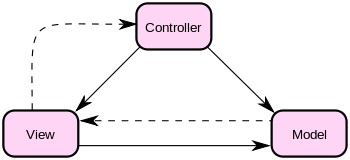
An MVC Checklist (Java)

Model-View-Controller (MVC2) and Model-View-Controller 2 (MVC2) are the de-facto patterns to use when developing Java and .NET web applications.

Here is a checklist to follow in order to apply the MVC pattern in Java:
  1. Each of your JSP page (the View) has a corresponding servlet (the Controller).
  2. Your database objects are mapped to "Model Objects", usually POJOs that mirror the database structure to Java Objects. (the Model).
  3. From your web application pages, you have no direct html links to your JSP pages. Instead, your links point to the corresponding servlet of each JSP page.
  4. Each JSP page posts back to its Controller servlet. In other words, the <form&ht; tag on your JSP page has the action attribute set to the Controller servlet url.
    Example: <form method="POST" action="/myServlet">
  5. Each Controller Servlet handles/checks for "actions" and after processing, forwards or redirects to the JSP View Page. Here are some standard Controller Servlet actions:
    • "edit": where the Controller Servlet calls the Model which loads a record from a database based on same criteria, and then forwards to the JSP View page. The record is shown to the user available for editing.
    • "save": where the Controller Servlet loads data from the Http Request to the correspondind Model Object, calls a save routine and then forwards to a JSP View page.
    • "create": where the Controller Servlet calls the correspondind Model Object's create method, and then forwards to a JSP View page. This is where our uses can create new records.
    • "delete": where the Controller Servlet calls the corresponding Model Object's delete method, and then forwards to a JSP View page. This is where our uses delete records.
Here is the MVC diagram: (source: Wikimedia Commons)
The solid line represents a direct association, the dashed an indirect association (via an observer for example).

Thursday, June 9, 2011

Visual Basic Function to get Eastern Orthodox Easter for a Year

From http://www.smart.net/~mmontes/ortheast.html#ALG
Function getEasterDate(year As Integer) As Date
    
    Dim GoldenNum As Integer
    Dim daysToPaschalFullMoon As Integer
    Dim weekdayOfPaschalFullMoon As Integer
    Dim numDaysFrom21ToPaschalFullMoon As Integer
    Dim EasterMonth As Integer
    Dim EasterDay As Integer
    
    GoldenNum = year Mod 19
    daysToPaschalFullMoon = (19 * GoldenNum + 15) Mod 30
    weekdayOfPaschalFullMoon = (year + year / 4 + daysToPaschalFullMoon) Mod 7
    numDaysFrom21ToPaschalFullMoon = daysToPaschalFullMoon - weekdayOfPaschalFullMoon
    EasterMonth = 3 + (numDaysFrom21ToPaschalFullMoon + 40) / 44
    EasterDay = numDaysFrom21ToPaschalFullMoon + 28 - 31 * (EasterMonth / 4) + 13

    getEasterDate = DateSerial(year, EasterMonth, EasterDay)
    
End Function